You have create many blogs and you blog have result a money from Adsense advertising. May be you sometimes think that you want to change your Blogspot Address into your domain dot com. Blogspot will advise you for don't change your blogspot address because you have many reader in blogspot address or you have a good rank for your blogspot address.
If you by or will build a new address using domain dot com, this better if you build this domain from the beginning because your blogspot address or from your domain dot com can create link to your blogspot and otherwise from blogspot to your domain dot com and from your new domain you can get money from AdSense advertising.
For advertise other party such as Bidvertise or others, you better build your web using other hosting not in Google, because Google will block your advertise show in text link. But if you only want show in image adds it's will no problem to create in Google either you still can show your adsense unit in your site. One of my web that use google is on Health Tips Diseases on this Google service we can create site that completed with site map like on Viruses and Start page for search engine.
August 31, 2008
August 26, 2008
AdSense Click Price
This blog is about AdSense, and will talk all about AdSense problem. AdSense is other name of advertiser group on Google that should pay with a certain calculation as their agreement and as advertiser’s self determination.
Not all AdSense publisher like us in their website or Google will get big money from their advertisement that put in their website or blog, because not all publisher set their click with a higher money. If they identify what is their advertisement will install such as in swasasi.webs.com then only on this web their advertisement will merge or certain website can put a higher price of every AdSense click on their website so that only AdSense advertiser that set their AdSense with a suitable price can be merge in those website. So that is why if your site or your blog will not get a higher income.
Blog in blogspot have vary price value of their AdSense advertisement click, this variation can span from $ 0.1 to $ 10 but if some advertiser set their price high then will not merge in blogspot. So if you have a well known website you can set your click price on your website, of course your web must commercial web, not free web. Advertiser using AdWord can set their click price, if they set their price too low and make their AdSense can only merge in Blogspot or other free website.
Want see my advice before you change your web or blog into paid blog or pair web. See you NEXT week.
Not all AdSense publisher like us in their website or Google will get big money from their advertisement that put in their website or blog, because not all publisher set their click with a higher money. If they identify what is their advertisement will install such as in swasasi.webs.com then only on this web their advertisement will merge or certain website can put a higher price of every AdSense click on their website so that only AdSense advertiser that set their AdSense with a suitable price can be merge in those website. So that is why if your site or your blog will not get a higher income.
Blog in blogspot have vary price value of their AdSense advertisement click, this variation can span from $ 0.1 to $ 10 but if some advertiser set their price high then will not merge in blogspot. So if you have a well known website you can set your click price on your website, of course your web must commercial web, not free web. Advertiser using AdWord can set their click price, if they set their price too low and make their AdSense can only merge in Blogspot or other free website.
Want see my advice before you change your web or blog into paid blog or pair web. See you NEXT week.
August 24, 2008
AdSense Background Code
How to customize your Adsense Background become same as your page background? To make your Adsense background same as your page back ground must using tools for this. To customize this background is easy if your page using a standard color like white (#FFFFFF), black (#000000), normal blue (#000FFF), normal Red (#FF0000), and normal yellow (#FFF000) or Grey (#C0C0C0).
The problem will come if your web or page is use a non standard background, because if different in just 1 symbol will result in different view. To overcome this problem some webmaster may using different tools for this purpose. I myself using Microsoft FrontPage applications.
Open your website, then open your FrontPage too. In normal view of FrontPage, write something like AAAA then block this letters. Then arrow in the Highlight toolbar in FrontPage, then click More Colors, then click Select. After click this symbol then go to your web and click this penlike cursor to the back ground color of your web or page which is Adsense code installed or will install.
In your FrontPage letter background will have the same color with your Page background color. To get background code, click HTML sheet like in excel and you will see HTML code. In the body part will expressed the background-color: #C0C0C0 so this is your code and then change your AdSense background color symbol with this code. Apply this tips and Good Luck.
The problem will come if your web or page is use a non standard background, because if different in just 1 symbol will result in different view. To overcome this problem some webmaster may using different tools for this purpose. I myself using Microsoft FrontPage applications.
Open your website, then open your FrontPage too. In normal view of FrontPage, write something like AAAA then block this letters. Then arrow in the Highlight toolbar in FrontPage, then click More Colors, then click Select. After click this symbol then go to your web and click this penlike cursor to the back ground color of your web or page which is Adsense code installed or will install.
In your FrontPage letter background will have the same color with your Page background color. To get background code, click HTML sheet like in excel and you will see HTML code. In the body part will expressed the background-color: #C0C0C0 so this is your code and then change your AdSense background color symbol with this code. Apply this tips and Good Luck.
August 23, 2008
Adsense Tips
Are you looking for secret tips of adsense? Do you want to earn thousands of dolars from your blog/website. Let us learn the secret tips of adsense and make tons of $$$$$$. First read carefully adsense programme policies. before you start. Don't click on the adsense ads or ask some one to click on it. Don't try to be clever; google adsense is much smarter than you. Learn carefully Adsense Optimisation Tips. You should keep in mind the main point in the webmaster guidelines is to make sites for visitors, not for search engines. Visitor-friendly design makes for search engine friendly design as well. Learn more Search engine optimization tips and make sure you have acquired sufficient inbound links. Learn more How to get inbound links. Read Page ranking tips and if your page rank is high you may earn from Adsense: Page Impression also. Since Traffic is the life blood of your site/blog so try your level best to drive More Traffic for your blog/website.
Another secret is Don't open your page frequently. Adsense Ads in your page should be minimum. Thereby your CTR will be high. You should also keep in mind to get clicks in the adsense ads that the text ads of your page should be the same background as your site page. Also use ads without border. From custom channels you can understand what ad is performing better. Filter your adsense ads accordingly. Do not miss to read How much will earn through this programme
Last but not the least I would like to say one thing that don't be selfish. If you have visited a site which is helpful for you, you should comment and give a link to the site. If you give a link you may get links from others in future. So be co-operative.
August 18, 2008
Paid Participation Tips and Effect in Google Page Rank
If your blog decide to follow for paid participation be careful of the effect of your site rank in Google. Because not all affiliate program can increase your money revenue. After you follow some affiliate program, some negative effect can happen to your blog especially in Google Page Rank.
Google also have third party have work together with, this is better if you just follow to this affiliate program if you want follow some affiliate program and your blog still exist in Google. To know what third party that has been working together with Google, you can search directly in Google Search with keyword ‘Google Third Party Affiliate’. Google don’t want other party advertise in text format of their advertisement in their free page or your web with AdSense account, because this can overlap with AdSense advertising program.
But if your blog have too far unintentionally, and this makes your blog rank becomes Zero in Google page rank. Some tips and action may able to try to your blog as follows:
Remove your paid participation program then reported to Google, if you’re paid participation is no more effective. To do this you can log on into your Google account and go to Webmaster tool, inside this tool there is some tool to make about this report.
If you don’t want to remove your participation program and your blog have no link (internal link and external link) as webmaster tools record (even though your blog have allot of links), you can try the next tips.
Remove your blog URL in webmaster tools; then add your blog URL again like register for new Blog into webmaster tools, then create again your sitemaps.
Republish some of your blog that contains of links (internal links or external links). To make republish like you create new link in your blog or insert new text in your blog article then publish.
Then you must be patient and pray to God for waiting your blog being index again by Google. After your blog being index by Google then your internal and external links will calculate by Google, and for this reason your blog may recalculate of real page rank in Google.
Google also have third party have work together with, this is better if you just follow to this affiliate program if you want follow some affiliate program and your blog still exist in Google. To know what third party that has been working together with Google, you can search directly in Google Search with keyword ‘Google Third Party Affiliate’. Google don’t want other party advertise in text format of their advertisement in their free page or your web with AdSense account, because this can overlap with AdSense advertising program.
But if your blog have too far unintentionally, and this makes your blog rank becomes Zero in Google page rank. Some tips and action may able to try to your blog as follows:
Remove your paid participation program then reported to Google, if you’re paid participation is no more effective. To do this you can log on into your Google account and go to Webmaster tool, inside this tool there is some tool to make about this report.
If you don’t want to remove your participation program and your blog have no link (internal link and external link) as webmaster tools record (even though your blog have allot of links), you can try the next tips.
Remove your blog URL in webmaster tools; then add your blog URL again like register for new Blog into webmaster tools, then create again your sitemaps.
Republish some of your blog that contains of links (internal links or external links). To make republish like you create new link in your blog or insert new text in your blog article then publish.
Then you must be patient and pray to God for waiting your blog being index again by Google. After your blog being index by Google then your internal and external links will calculate by Google, and for this reason your blog may recalculate of real page rank in Google.
August 15, 2008
AdSense For Feed
AdSense has launched new feature for advertise their customer, this feature called as AdSense for Feed. You can install and create channel for Adsense for feed, when you login into your AdSense account, then click Adsense Setup. You can find AdSense for Feed there, and as usual you can create this channel.
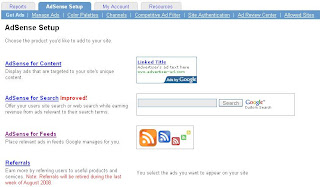
The different of this feature you can't get AdSense code for this channel unit, because will automatically advertising text or drawing will merge in your feed. If you use for the first time for certain feed you must click the link of burning new feed, such as bellow image.

After click those link then you fill your URL to create feed address, for blogger in blogspot should chose one of your feed: Atom feed or RSS feed, and the address for this feed generally will like this one: http://feedproxy.google.com/BlogReviewCenter, BlogReviewCenter is change with your blog title.

After fill the above form the save, and after submit this new unit, this channel will merge in your feed with the above address address. You can submitted your feed into Google Reader and share to others reader.

The different of this feature you can't get AdSense code for this channel unit, because will automatically advertising text or drawing will merge in your feed. If you use for the first time for certain feed you must click the link of burning new feed, such as bellow image.

After click those link then you fill your URL to create feed address, for blogger in blogspot should chose one of your feed: Atom feed or RSS feed, and the address for this feed generally will like this one: http://feedproxy.google.com/BlogReviewCenter, BlogReviewCenter is change with your blog title.

After fill the above form the save, and after submit this new unit, this channel will merge in your feed with the above address address. You can submitted your feed into Google Reader and share to others reader.
August 14, 2008
See Your Diary Using Web History
Your activity everyday of using Internet have recorded by Google using Web History, actually google have record your everyday activity and you can view your activity of using Internet with just click the date on the Calendar.
What can you do by using Web History as follows:
- View and manage your web activity.
You know that great web site you saw online and now can't find? From now on, you can. With Web History, you can view and search across the full text of the pages you've visited, including Google searches, web pages, images, videos and news stories. You can also manage your web activity and remove items from your web history at any time. - Get the search results most relevant to you.
Web History helps deliver more personalized search results based on the things you've searched for on Google and the sites you've visited. You might not notice a big impact on your search results early on, but they should steadily improve over time the more you use Web History. - Follow interesting trends in your web activity.
Which sites do you visit frequently? How many searches did you do between 10 a.m. and 2 p.m.? Web History can tell you about these and other interesting trends in your web activity.
For using this just login to your google account then click My account then click Web History, if you using your language this word will translate to your language, in Indonesia say Riwayat Web. After you click this link you will see like the draw bellow, on those page click Enable Web History button.
August 8, 2008
Review Blog Using Google Analytic

If your blog have listing in the Google Search then you may need to analyze the performance of every your blogs. For this purpose you need to Signup to Google Analytic that serve you and give to you about those need data.
First you must log in to your Google account, after login you can see there is Analytic link, you click this link than you must sign up to Google Analytic.
After you signup than you will enter to Google analytic, from here you must enter you blog name to review using this tools like below: Click Add Website Profiles.
First you must log in to your Google account, after login you can see there is Analytic link, you click this link than you must sign up to Google Analytic.
After you signup than you will enter to Google analytic, from here you must enter you blog name to review using this tools like below: Click Add Website Profiles.
 After entering your blog url name, you must install the code into your website or blog. If you create in Blogger you intall this code between (body) and (/body) or in the last code before the end of body. After install and save in you HTML web code or HTML blog code, than back again to sign up to Google account and enter to Google analytic, and verify again and click finish button.
  Stumble It!
August 1, 2008
Get Listing in Search Engine
After you completed create your blog or site and have apply an AdSense code into your Blog/Site then you must make your site can search by Search Engine like at Google Search or in Yahoo Search or at MSN Search engine. Be careful to write your site address must complete and don’t write wrong, for this purpose you can use copy from your explorer bar and paste to Submit.
 your site address name to this webmaster tools. After add your site to Google Webmastertool, then verify your site on the next step if your site still don’t any code that must inserted to your site, there is a message “NOT VERIFIED”. Then choose the type to verify on the text ‘choose verification method’ box.
Then choose the type to verify on the text ‘choose verification method’ box.
There are two type can be use for verify your site, if you create site in Blogger you can choose: ‘Add a meta tag’ then will merge the code in box in the below of the text.
1. I've created a file named google79ae8477f0dc68e8.html.
2. I've uploaded the file to http://yoursiteaddress.com/ and can view http://your siteaddress.com/google79ae8477f0dc68e8.html in my browser.
Subscribe to:
Posts (Atom)